

ETF Look-Through Exposure Report
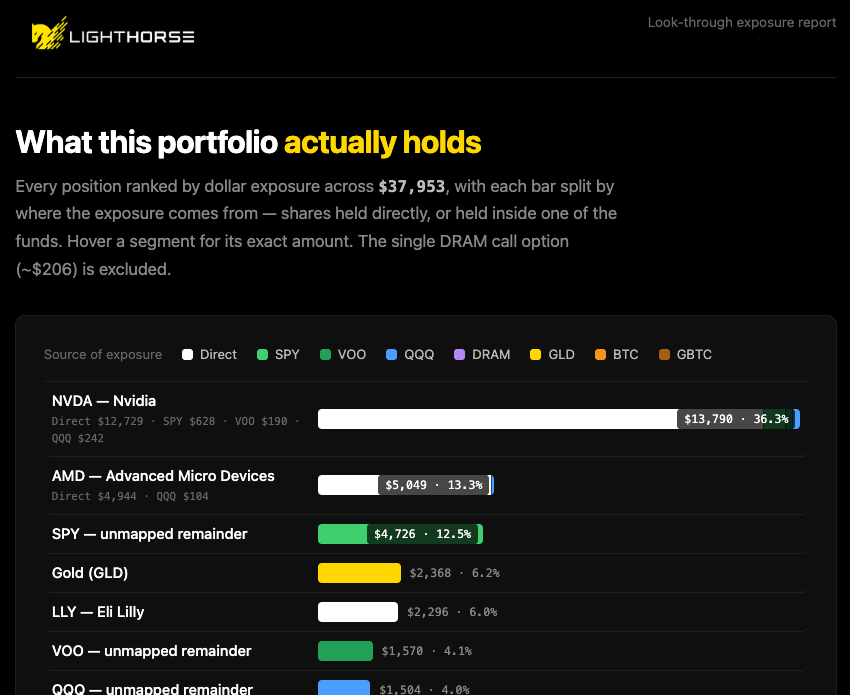
How to pull Light Horse positions and expand each ETF into its published holdings, rendering a standalone HTML report with true dollar exposure to every name.
Token cost
- Input
- 6k – 9k
- Output
- 8k – 12k
A rough estimate for one run, covering the prompt itself plus the data the assistant pulls back from the tools it calls. Your actual usage depends on the model, the size of your portfolio, and how much the assistant retries.
The prompt
The goal is to resolve any ETFs from user's portfolio to their holdings and compute real exposure to each asset. If you don't have a Light Horse tool - say so and stop. If your environment does allow fetching content from web sites - say so and stop.
## 1. The prompt
Use my Light Horse connected account. Pull my current positions. For every ETF I hold, fetch its holdings from https://www.lighthorse.io/tickers/{ticker}/holdings.md (lowercase ticker). Compute my look-through exposure: combine direct stock positions with each ETF's top-10 holdings weighted by my dollar equity in that fund. Treat the portion of each fund beyond its published top-10 as a separate "<TICKER> — unmapped remainder" line. Keep Gold, Bitcoin, and Cash & T-bills as their own lines. Exclude options from the exposure tally but note them. Sort everything descending by dollar amount and render horizontal bars where each bar is stacked by source (Direct, and each contributing fund), with a per-source breakdown line under any multi-source name. Generate a standalone HTML file (all CSS inline, Light Horse logo embedded as base64) using the lighthorse.io design system, and give me the file.
## 2. Tools to call, in order
1. **`get-positions`** (MCP connector; load it via tool search first if deferred). Returns all positions with `symbol`, `security_type` (`stock` / `etf` / `option`), `shares`, `price`, and `equity` (dollar value). Use `equity` as the dollar weight everywhere.
2. **Holdings data** — for each position with `security_type == "etf"`, fetch `https://www.lighthorse.io/tickers/<ticker>/holdings.md` (lowercase ticker; e.g. `https://www.lighthorse.io/tickers/voo/holdings.md`). In a code environment, `curl` works since `*.lighthorse.io` is network-allowed; `web_fetch` also works. Verify HTTP 200 per file.
3. **Logo** — download `https://www.lighthorse.io/logo.png` (2833×660 RGBA; transparent background with white + gold marks, made for a black background). Resize to ~640 px wide and base64-encode it for embedding (~24 KB), e.g. with PIL + `base64`.
## 3. Parsing the holdings pages
Each `holdings.md` page contains a markdown table of the fund's **top-10 holdings only**:
```text
| Ticker | Weight |
| --- | --- |
| NVDA | 7.55% |
...
```
Extraction regex (Python, multiline): `^\| (.+?) \| ([\d.]+)% \|$`
Classification examples for each holding row:
- `Gold` → commodity line "Gold (GLD)".
- `Bitcoin` → crypto line "Bitcoin" (sum across BTC and GBTC funds; both are 100% Bitcoin).
- Cash-like → one "Cash & T-bills" line: ticker `FGXXX` (money-market), `U.S. Dollar`, or any name starting with `United States Treasury`.
- Numeric Korean tickers: `005930` = "Samsung Elec (005930)", `000660` = "SK Hynix (000660)".
- Everything else → a stock ticker.
## 4. The math
For each ETF with your equity `E` and parsed holdings weights `w_i` (as fractions):
- Contribution of holding *i* from that fund = `E × w_i`. Record it per **source** (the fund).
- Unmapped remainder = `E × (1 − Σw_i)`; add as its own line `"<TICKER> — unmapped remainder"` with the fund itself as source (skip if under ~$0.50; fully-covered funds like GLD/BTC/GBTC have none).
For each direct stock position: contribution = its `equity`, source = `Direct`.
Then, per display line, sum contributions across sources. Some tickers can be grouped like `GOOGL + GOOG` combined` everything else its own line. **Exclude options** from the tally; mention them in the lede (e.g. "The single DRAM call option (~$204) is excluded.").
Sort all lines descending by total. Sanity check: the grand total must equal (sum of stock equities) + (sum of ETF equities).
## 5. Populating the HTML template
Placeholders in the template (section 6):
| Placeholder | What goes there |
| --- | --- |
| `{{LOGO_BASE64}}` | Base64 of the resized logo.png (no data-URI prefix; the `src` already has it) |
| `{{REPORT_DATE}}` | Today's date, e.g. `September 14, 2026` (appears twice) |
| `{{TOTAL}}` | Grand total, e.g. `$37,684` |
| `{{EXCLUSIONS_NOTE}}` | e.g. `The single DRAM call option (~$204) is excluded.` or empty |
| `{{HOLDINGS_AS_OF_DATES}}` | As-of dates from the pages' "Top holdings (as of …)" headers |
| `{{LEGEND_KEYS}}` | One `<span class="key"><i style="background:COLOR"></i>NAME</span>` per source |
| `{{BAR_ROWS}}` | One row block per line (below), in sorted order |
**Source colors** (semantic, tuned for the black background — keep these):
| Source | Color | | Source | Color |
| --- | --- | --- | --- | --- |
| Direct | `#ffffff` | | DRAM | `#b388f0` |
| SPY | `#3ecf6e` | | GLD | `#ffd700` |
| VOO | `#22a057` | | BTC | `#f7931a` |
| QQQ | `#4a9eff` | | GBTC | `#a35f0e` |
New funds: pick a distinct bright hue; keep related funds in related shades (SPY/VOO are both S&P 500 funds, hence two greens; BTC/GBTC two bitcoin-oranges). `Direct` is always white, `GLD` is always gold. Segment order within a bar follows the legend order (Direct first).
**Row block** — for each line with total `V`, portfolio share `S%`, and sources `(name, amount)`:
```html
<div class="row">
<div class="name">LINE_NAME<div class="sub">SRC1 $A1 · SRC2 $A2 · …</div></div>
<div class="track"><div class="bar" style="width:W%">
<i style="flex:F1;background:C1" title="SRC1: $A1"></i>
<i style="flex:F2;background:C2" title="SRC2: $A2"></i>
<span class="val in">$V · S%</span>
</div></div>
</div>
```
- `W` = `max(V / V_max × 100, 0.4)` — bar width as % of the largest line.
- Each segment's `flex` = `amount / V` (fractions summing to 1); `title` = `"SOURCE: $amount"`.
- Omit the `<div class="sub">…</div>` breakdown line when a line has only one source.
- Label placement: if `W > 26`, put `<span class="val in">` **inside** `.bar` (last child, as shown); otherwise put `<span class="val out">` **after** `.bar` inside `.track`.
- Dollar values formatted with thousands separators, no cents (`$13,711`); share with one decimal (`36.4%`).
**Style provenance** (don't re-derive; already extracted from lighthorse.io's shipped CSS): black `#000` background, panels `#0f0f0f`, hairlines `#1e1e1e`/`#2a2a2a`, text `#fff`/`#bbb`/`#888`/`#666`, gold `#ffd700` accent with tint overlays `#ffd70014`/`#ffd70008`, green `#3ecf6e`, system sans stack, `SF Mono`/`Fira Code` for numbers, 4–10 px radii, logo height `clamp(40px,5vw,60px)`. All of this is already baked into the template's CSS.
## 6. Full HTML template
Save the populated result to temporary store and present it to the user as file
```html
<!DOCTYPE html>
<html lang="en">
<head>
<meta charset="utf-8">
<meta name="viewport" content="width=device-width, initial-scale=1">
<title>Portfolio look-through exposure — Light Horse</title>
<style>
:root {
--bg:#000; --panel:#0f0f0f; --panel2:#161616; --line:#1e1e1e; --line2:#2a2a2a;
--text:#fff; --body:#888; --dim:#666; --bright:#bbb;
--gold:#ffd700; --gold-soft:#ffe44d; --gold-tint:#ffd70014; --gold-tint-lo:#ffd70008;
--green:#3ecf6e;
--sans:-apple-system,BlinkMacSystemFont,"Segoe UI",Roboto,"Helvetica Neue",Arial,sans-serif;
--mono:"SF Mono","Fira Code","Cascadia Code",monospace;
}
* { box-sizing:border-box; margin:0; }
body { background:var(--bg); color:var(--body); font-family:var(--sans);
font-size:1.05rem; line-height:1.65; padding:0 clamp(16px,4vw,64px) 72px; }
.sheet { max-width:1000px; margin:0 auto; }
header { display:flex; align-items:center; justify-content:space-between; gap:20px;
padding:22px 0; border-bottom:1px solid var(--line); flex-wrap:wrap; }
header img { height:clamp(40px,5vw,60px); width:auto; display:block; }
.meta { text-align:right; color:var(--dim); font-size:.85rem; line-height:1.5; }
h1 { color:var(--text); font-size:clamp(1.6rem,3.5vw,2.4rem); font-weight:700;
letter-spacing:-.02em; margin:44px 0 12px; line-height:1.2; }
h1 .accent { color:var(--gold); }
.lede { max-width:620px; }
.lede b { color:var(--bright); font-family:var(--mono); font-weight:600; font-size:.95em; }
.card { background:var(--panel); border:1px solid var(--line); border-radius:10px;
padding:clamp(16px,3vw,32px); margin-top:32px; }
.legend { display:flex; gap:16px 20px; flex-wrap:wrap; font-size:.82rem; color:var(--bright);
padding-bottom:16px; border-bottom:1px solid var(--line); }
.legend .lead { color:var(--dim); }
.key { display:inline-flex; align-items:center; gap:7px; }
.key i { width:11px; height:11px; border-radius:3px; display:inline-block; }
.row { display:grid; grid-template-columns:minmax(170px,250px) 1fr; gap:16px; align-items:center;
padding:9px 8px; border-bottom:1px solid var(--line); border-radius:6px; }
.row:last-child { border-bottom:none; }
.row:hover { background:var(--gold-tint-lo); }
.name { color:var(--text); font-size:.92rem; font-weight:500; line-height:1.35; }
.sub { color:var(--dim); font-family:var(--mono); font-size:.68rem; margin-top:3px;
line-height:1.5; }
.track { position:relative; display:flex; align-items:center; min-height:20px; }
.bar { height:20px; border-radius:4px; overflow:hidden; display:flex; align-items:stretch;
position:relative; min-width:2px; }
.bar i { display:block; min-width:1px; }
.bar i + i { box-shadow:inset 1px 0 0 rgba(0,0,0,.55); }
.val { font-family:var(--mono); font-size:.72rem; white-space:nowrap; }
.val.in { position:absolute; right:5px; top:50%; transform:translateY(-50%);
color:var(--text); background:rgba(0,0,0,.72); padding:1px 7px; border-radius:4px; }
.val.out { color:var(--body); padding-left:9px; }
footer { margin-top:36px; color:var(--dim); font-size:.82rem; max-width:720px; line-height:1.6; }
footer p + p { margin-top:8px; }
@media (max-width:620px) {
.row { grid-template-columns:1fr; gap:4px; padding:10px 4px; }
.meta { text-align:left; }
}
@media (prefers-reduced-motion:no-preference) {
.bar { animation:grow .7s cubic-bezier(.2,.7,.2,1) backwards; transform-origin:left; }
@keyframes grow { from { transform:scaleX(0); } }
}
</style>
</head>
<body>
<div class="sheet">
<header>
<img src="data:image/png;base64,{{LOGO_BASE64}}" alt="Light Horse">
<div class="meta">Look-through exposure report<br>{{REPORT_DATE}}</div>
</header>
<h1>What this portfolio <span class="accent">actually holds</span></h1>
<p class="lede">Every position ranked by dollar exposure across <b>{{TOTAL}}</b>, with each
bar split by where the exposure comes from — shares held directly, or held inside one of the
funds. Hover a segment for its exact amount. {{EXCLUSIONS_NOTE}}</p>
<div class="card">
<div class="legend"><span class="lead">Source of exposure</span>{{LEGEND_KEYS}}</div>
{{BAR_ROWS}}
</div>
<footer>
<p>“Unmapped remainder” is the part of each fund beyond its published top-10 holdings —
for broad index funds this is mostly the long tail of index stocks, so true single-stock exposure
runs somewhat higher than the named bars show.</p>
<p>ETF holdings from lighthorse.io ticker pages ({{HOLDINGS_AS_OF_DATES}});
holdings are periodic snapshots, not live positions. Positions and prices from the Light Horse
brokerage account as of {{REPORT_DATE}}. For information only — not investment advice.</p>
</footer>
</div>
</body>
</html>
```This prompt is published as an example of how third-party AI tools can be used with a Light Horse account. It is not investment advice and not a recommendation to buy, sell, or hold any security, and neither the prompt nor any output it produces has been reviewed for suitability for you. AI assistants make mistakes — verify anything you act on. See the Third-Party Integration Disclaimer.